> ## Documentation Index
> Fetch the complete documentation index at: https://dripart-chore-sync-comfy-api-v2-spec-d5155ac.mintlify.site/llms.txt
> Use this file to discover all available pages before exploring further.
# ComfyUI Depth Anything 3 公式サンプル
> ComfyUI で Depth Anything 3 を使用した画像と動画の単眼・多視点深度推定を学びましょう。
# ComfyUI Depth Anything 3 概要
[Depth Anything 3 (DA3)](https://github.com/ByteDance-Seed/Depth-Anything-3) は、ByteDance Seed が開発したビジョントランスフォーマーで、カメラポーズの有無にかかわらず、任意のビジュアル入力から空間的に一貫したジオメトリを復元します。単一の DINO エンコーダと統一された深度-レイ表現により、同一モデルファミリーで単眼深度、多視点深度、カメラポーズ推定、3D 再構築をカバーします。
主な機能:
* **統一された単眼・多視点深度**:単一または複数の画像から深度を推定
* **カメラポーズ推定**:順序なし画像セットからカメラ位置を復元
* **3D 再構築**:多視点入力をサポート
* **動画深度推定**:動画入力のフレームごとの深度シーケンスを生成
* **複数のモデルバリアント**:Small、Base、Mono/Metric Large
ComfyUI が最新版に更新されていることを確認してください。
* [ComfyUI のダウンロード](https://www.comfy.org/download)
* [更新手順](/ja/installation/update_comfyui)
このガイドで紹介するワークフローは、[ワークフローテンプレート](/ja/interface/features/template)から入手できます。
テンプレート内に該当のワークフローが見つからない場合、ComfyUI のバージョンが古くなっている可能性があります。
ワークフローを読み込んだ際にノードが欠落している場合の考えられる原因:
1. 最新の ComfyUI(Nightly 版)を使用していない
2. 起動時に一部のノードのインポートに失敗している
* [Cloud](https://cloud.comfy.org) は、ComfyUI の安定版リリース後に更新されます。
したがって、このドキュメントでコアノードが見つからない場合、それは新しいコアノードがまだ最新の安定版にリリースされていない可能性があります。次回の安定版リリースをお待ちください。
ComfyUI は Depth Anything 3 ノードをネイティブサポートしています。始める前に [ComfyUI](https://github.com/Comfy-Org/ComfyUI) を最新バージョンに更新してください。
## モデルインストール
Depth Anything 3 チェックポイントをダウンロードし、対応する ComfyUI フォルダに保存します:
* **Small** ([depth\_anything\_3\_small.safetensors](https://huggingface.co/Comfy-Org/Depth-Anything-3/resolve/main/geometry_estimation/depth_anything_3_small.safetensors)) — 軽量で高速な推論
* **Base** ([depth\_anything\_3\_base.safetensors](https://huggingface.co/Comfy-Org/Depth-Anything-3/resolve/main/geometry_estimation/depth_anything_3_base.safetensors)) — バランスの取れた性能
* **Mono-Large** ([depth\_anything\_3\_mono\_large.safetensors](https://huggingface.co/Comfy-Org/Depth-Anything-3/resolve/main/geometry_estimation/depth_anything_3_mono_large.safetensors)) — 単眼深度に最適(空検出対応)
* **Metric-Large** ([depth\_anything\_3\_metric\_large.safetensors](https://huggingface.co/Comfy-Org/Depth-Anything-3/resolve/main/geometry_estimation/depth_anything_3_metric_large.safetensors)) — メートル単位の物理深度(空検出対応)
```
ComfyUI/
├── models/
│ ├── geometry_estimation/
│ │ ├── depth_anything_3_small.safetensors
│ │ ├── depth_anything_3_base.safetensors
│ │ ├── depth_anything_3_mono_large.safetensors
│ │ └── depth_anything_3_metric_large.safetensors
```
## サンプルワークフロー
Depth Anything 3: 画像深度推定
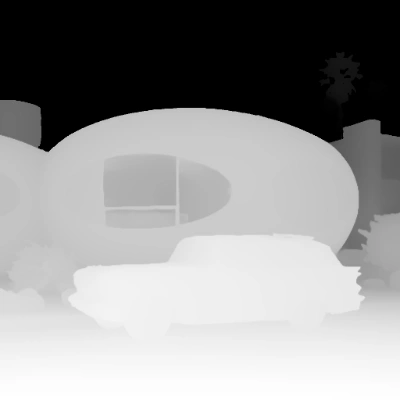
画像を1枚アップロードすると、Depth Anything 3 を使用して深度マップを生成できます。オリジナル画像と深度出力を並べて比較表示します。
 Comfy Cloudで開く
JSONをダウンロードするか、テンプレートライブラリで「Depth Anything 3: Image Depth Estimation」を検索してください
**入力ファイル**
このファイルを対応する `LoadImage` ノードにアップロードします:
`LoadImage` ノード85 · `retro_futuristic_home.png`
### 実行手順
1. **LoadImage**: 入力画像を読み込む
2. **LoadDA3Model**: Depth Anything 3 のバリアントを選択する
3. **Run**: Queueをクリックするか、`Cmd+Enter` を押します
4. ワークフローは、深度マップと並べて比較した結果を出力します
このワークフローは、モジュール式の処理に Subgraph ノードを使用します。Subgraph ドキュメントを確認して、ワークフローのカスタマイズや拡張方法を学んでください。
Comfy Cloudで開く
JSONをダウンロードするか、テンプレートライブラリで「Depth Anything 3: Image Depth Estimation」を検索してください
**入力ファイル**
このファイルを対応する `LoadImage` ノードにアップロードします:
`LoadImage` ノード85 · `retro_futuristic_home.png`
### 実行手順
1. **LoadImage**: 入力画像を読み込む
2. **LoadDA3Model**: Depth Anything 3 のバリアントを選択する
3. **Run**: Queueをクリックするか、`Cmd+Enter` を押します
4. ワークフローは、深度マップと並べて比較した結果を出力します
このワークフローは、モジュール式の処理に Subgraph ノードを使用します。Subgraph ドキュメントを確認して、ワークフローのカスタマイズや拡張方法を学んでください。
Depth Anything 3: 動画深度推定

動画をアップロードすると、フレームごとの深度シーケンスを生成できます。サブグラフ内では、**GetVideoComponents** が入力動画をフレームに分割し、**LoadDA3Model** がモデルをロードし、**SetVideoComponents** が深度フレームをビデオ出力に再構成します。
 Comfy Cloudで開く
JSONをダウンロードするか、テンプレートライブラリで「Depth Anything 3: Video Depth Estimation」を検索してください
**入力ファイル**
このファイルを対応する `LoadVideo` ノードにアップロードします:
`LoadVideo` ノード87 · `empty_room_assembly.mp4`
Comfy Cloudで開く
JSONをダウンロードするか、テンプレートライブラリで「Depth Anything 3: Video Depth Estimation」を検索してください
**入力ファイル**
このファイルを対応する `LoadVideo` ノードにアップロードします:
`LoadVideo` ノード87 · `empty_room_assembly.mp4`
### 実行手順
1. **LoadVideo**: 入力動画を読み込む
2. **モデルを選択**: **Small**、**Base**、**Mono-Large**、**Metric-Large** から選択します
3. **Run**: Queueをクリックするか、`Cmd+Enter` を押します
4. ワークフローは、フレームごとの深度マップを持つビデオを出力します
このワークフローは、モジュール式の処理に Subgraph ノードを使用します。Subgraph ドキュメントを確認して、ワークフローのカスタマイズや拡張方法を学んでください。
## モデルバリアント
| バリアント | head\_type | 空の検出 | 信頼度推定 | カメラデコーダー | 最適な用途 |
| ---------------- | ---------- | :--: | :---: | :------: | --------------- |
| **Small** | dualdpt | ❌ | ✅ | ✅ | モバイル/エッジ向けの高速推論 |
| **Base** | dualdpt | ❌ | ✅ | ✅ | バランスの取れた性能 |
| **Mono-Large** | dpt | ✅ | ❌ | ❌ | 空の検出付き単眼深度 |
| **Metric-Large** | dpt | ✅ | ❌ | ❌ | メートル単位の物理的深度 |
* **Small** と **Base** は、`dualdpt` ヘッドタイプを採用し、信頼度推定とカメラデコーダーサポートを備え、マルチビューアプリケーションに対応します。
* **Mono-Large** と **Metric-Large** は、`dpt` ヘッドタイプを採用し、空の検出に対応します。Metric-Large は、メートル単位の生の深度を出力します。
## コミュニティリソース
* [Depth Anything 3 GitHub (ByteDance-Seed)](https://github.com/ByteDance-Seed/Depth-Anything-3): 研究論文とコード
* [Comfy-Org/Depth-Anything-3](https://huggingface.co/Comfy-Org/Depth-Anything-3): 公式 ComfyUI モデルウェイト